WM Open · Joomla 6

WM Surveys for Joomla

Free v1.0.0

Free polls and short surveys

Polls and short surveys for Joomla 6. Publish a question from the dashboard, then show it in a menu, a module, or an article.

Requires Joomla 6.0+ · PHP 8.3+ · MySQL or MariaDB · GNU General Public License version 2 or later · Package pkg_wmsurveys

Why this package?

A public poll that should live on the Joomla site, not in a third-party form:

  • Publish a question from the dashboard without a manual
  • Show the same poll in a menu, a module, or an article
  • Choose who can vote, and how a repeat vote is recognised
  • Keep addresses and network details as hashes
  • Close on a date, email you, and archive when you ask

WM Surveys is that poll — a Joomla 6 package, released free.

Capabilities

What’s included

Package contents

  • com_wmsurveys — Component — dashboard, builder, polls, responses and results
  • mod_wmsurveys — Site module — one poll in any module position
  • plg_content_wmsurveys — Content plugin — {wmsurveys 12} or {wmsurveys id=12} in an article
  • plg_pagecache_wmsurveys — Page Cache plugin — keeps vote requests out of the Joomla page cache
  • plg_task_wmsurveys — Task plugin — close finished polls, send the close notice, archive when asked

Current version: 1.0.0

Features

  • One question is a poll. More than one is stored as a survey.
  • Question types: one choice, several choices, yes or no, stars, a 1–10 scale, ranking, Likert, and a written answer
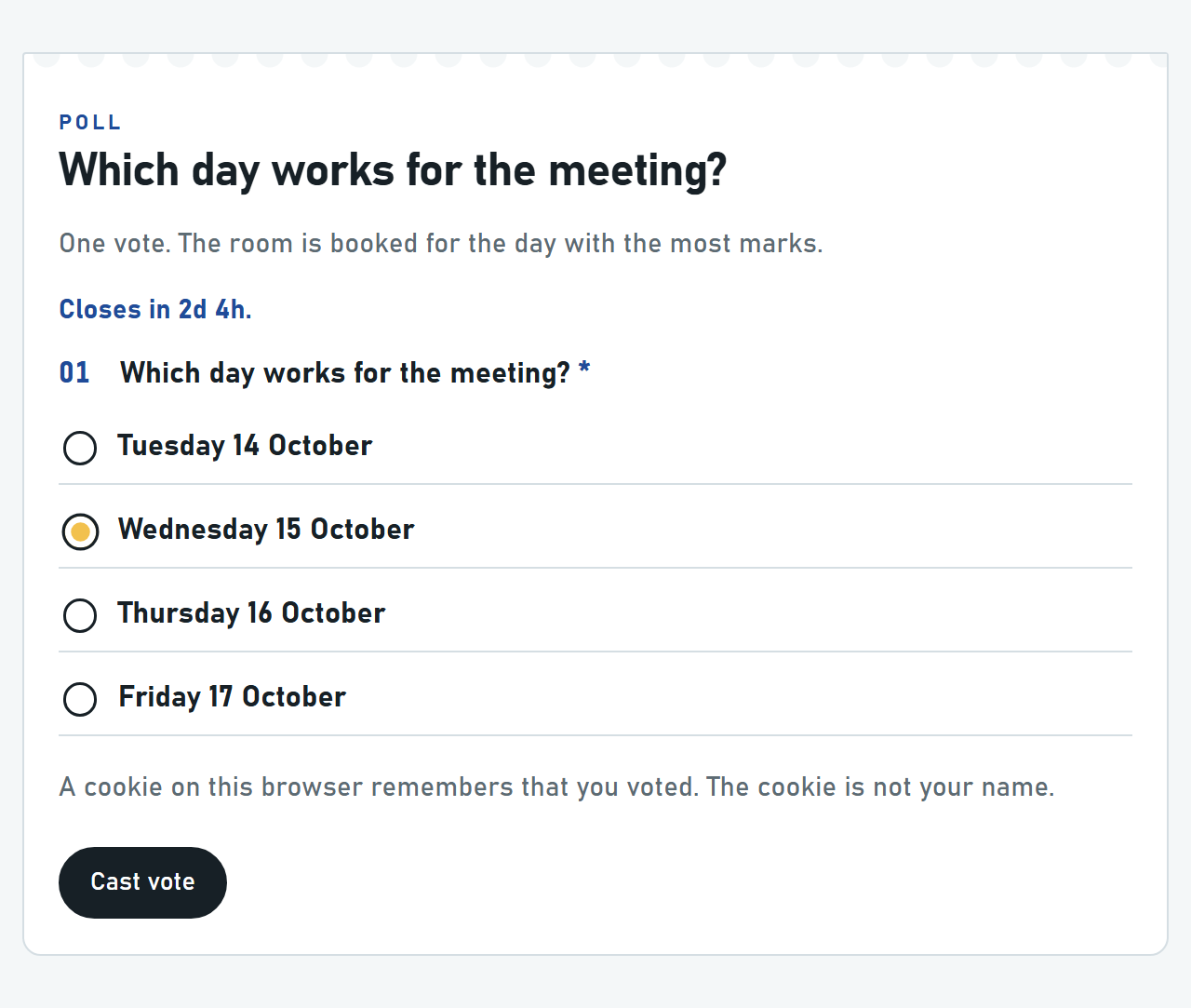
  • Looks: Slip, Night, Poster, Quiet, and Gallery. A custom colour is used only as #rrggbb.
  • Who can vote: anyone, signed-in users, or selected groups
  • Repeat votes: no limit, a browser cookie, cookie plus a network-address hash, those plus a browser-name hash, the Joomla account, or a six-digit code emailed to the voter
  • Address, account id and network address are stored only as hashes
  • Visitors see results never, after they vote, after voting closes, or always — counts, or percentages only
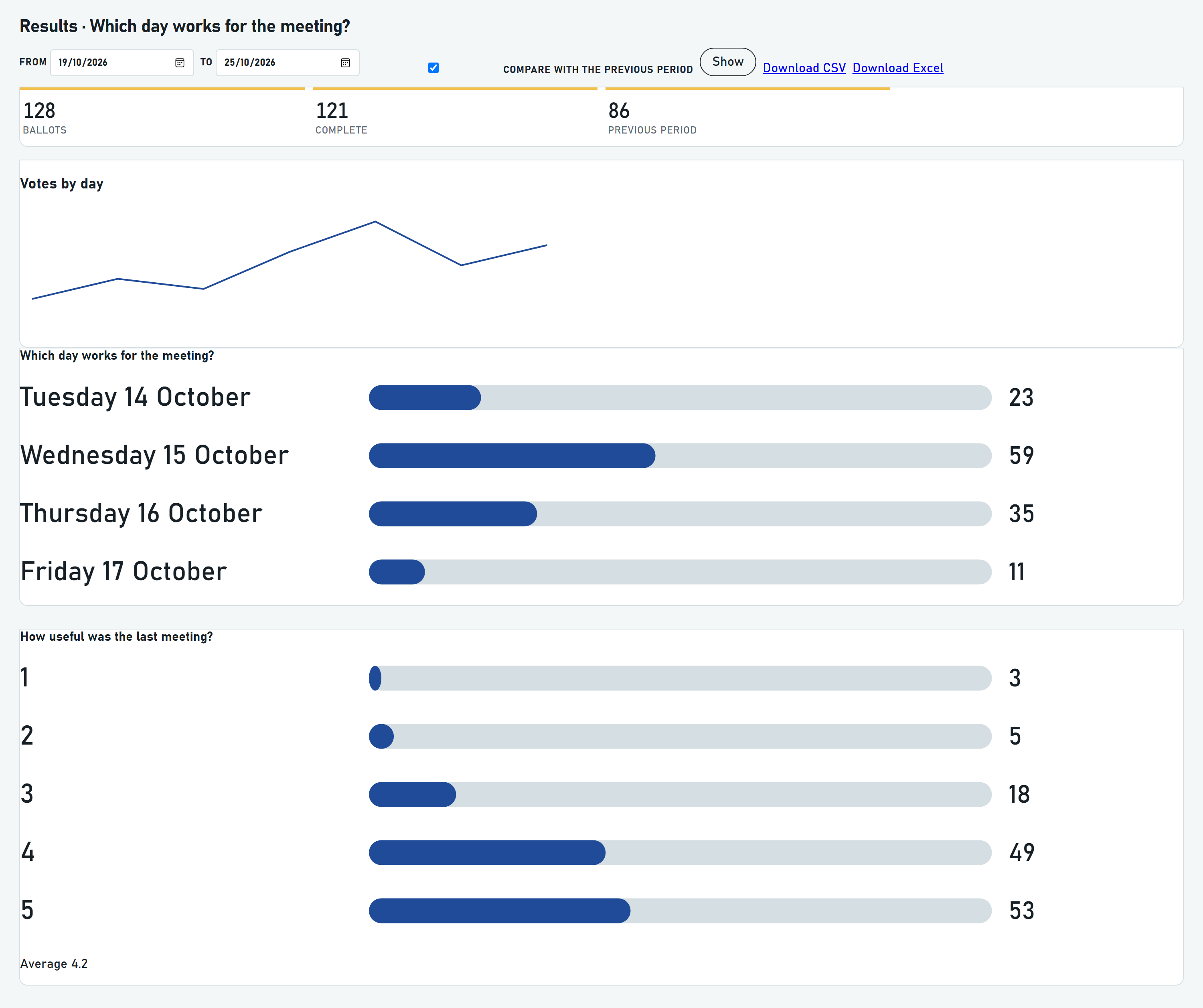
  • Administrators get the full tally, a date filter, a comparison with the previous period, and CSV or Excel
  • Open and close dates, a countdown, an email when voting closes, and optional archive after close
  • hCaptcha, or the captcha plugin Joomla already has
  • JSON export and import of the poll definition. Votes are not in the file. An import is saved unpublished.

Admin

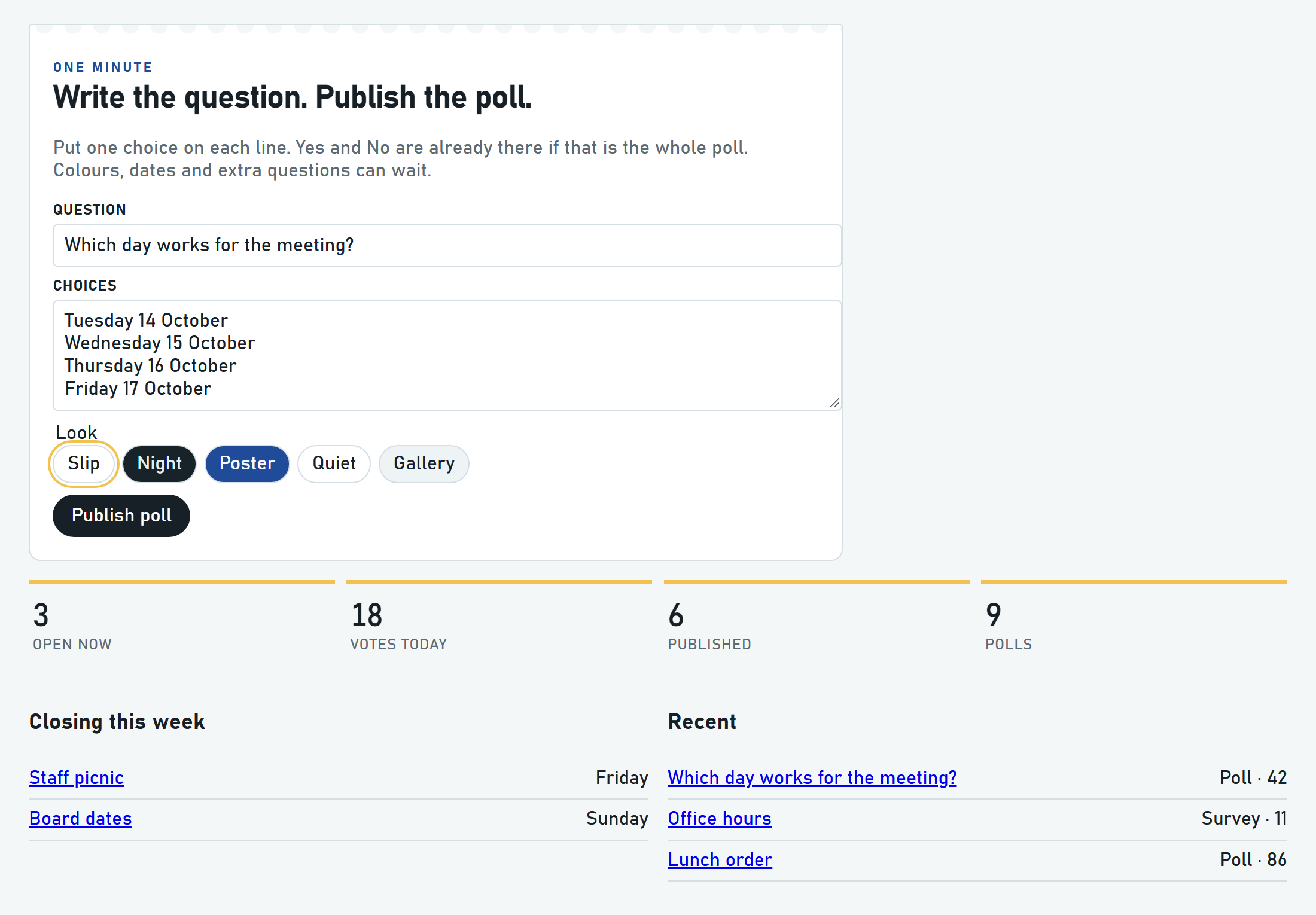
  • Components → wmSurveys — type the question, one choice per line, pick a look, Publish poll
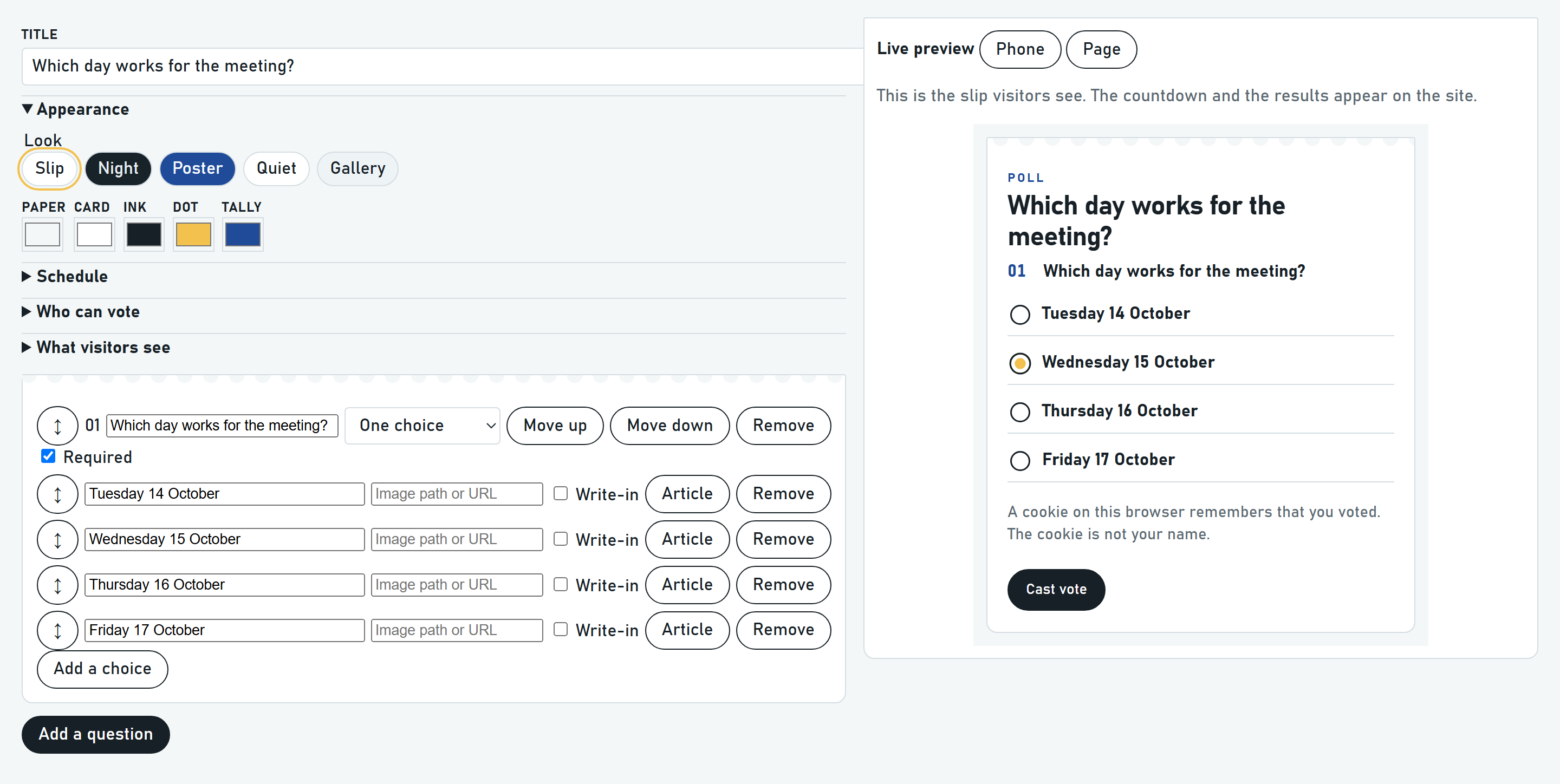
  • Builder: add questions, drag them into order, change colours, preview the slip
  • A question that already has votes keeps its type. Removing a choice hides it and leaves its votes in the tally.
  • Results: date filter, previous period, CSV or Excel. Formula-like cells are prefixed so a spreadsheet does not run them.
  • Options: trust a proxy, hCaptcha site key and secret, extra addresses for close notices
  • Polls list: export one poll as JSON, or import a JSON definition

Front end

  • Menu item: Single poll
  • wmSurveys module in any module position
  • {wmsurveys 12} or {wmsurveys id=12} in an article
  • The slip HTML is the same for every visitor. The browser then asks whether this visitor has voted, and posts the vote separately.
  • A published poll with empty open and close fields stays open

Extras

Best suited for

  • Council and association consultations
  • Member polls on a Joomla site
  • Short surveys that should stay inside the CMS

Documentation

Install, configure & use

WM Surveys is a free Joomla 6 package for polls and short surveys. Publish from the dashboard, then place the poll with a menu item, the site module, or an article tag. Built for Joomla 6.2 and installs on Joomla 6.0 or newer. MySQL or MariaDB. The interface is English.

Requirements

  • Joomla 6.0 or later (built for 6.2)
  • PHP 8.3 or newer
  • MySQL or MariaDB

Install

  1. Download pkg_wmsurveys-1.0.0.zip from this page.
  2. In Joomla: System → Install → Extensions → Upload Package File.
  3. Select pkg_wmsurveys-1.0.0.zip and install.
  4. Confirm com_wmsurveys, mod_wmsurveys, plg_content_wmsurveys, plg_pagecache_wmsurveys and plg_task_wmsurveys installed successfully.

Quick start

  1. Open Components → wmSurveys. Type the question, leave one choice on each line, pick a look, and press Publish poll.
  2. Menus → Add New Menu Item → wmSurveys → Single poll. Or publish the wmSurveys module. Or put {wmsurveys 12} in an article. The number is the poll id.
  3. For a poll nobody visits in the administrator, System → Scheduled Tasks → New, type Close finished polls, and run it daily.
  4. hCaptcha: Components → wmSurveys → Options, then choose hCaptcha on the poll. Or use the captcha plugin already installed in Joomla.
  5. Trust a proxy stays off unless Cloudflare or another proxy you operate sits in front of the site.

More detail

The three plugins are enabled on install. Uninstall the package to remove them together. Uninstalling deletes the polls and the votes. The task plugin is installed, but the installer does not create the scheduled task. Leave Page Cache - wmSurveys enabled when System - Page Cache is enabled. The 1.0.0 package does not register a Joomla update server.

License

GNU General Public License version 2 or later

GPL-2.0-or-later

This software is free software: you can redistribute it and/or modify it under the terms of the GNU General Public License as published by the Free Software Foundation; either version 2 of the License, or (at your option) any later version.

This program is distributed in the hope that it will be useful, but WITHOUT ANY WARRANTY; without even the implied warranty of MERCHANTABILITY or FITNESS FOR A PARTICULAR PURPOSE. See the GNU General Public License for more details.

A copy of the license is included in the package as LICENSE.txt. Full text: gnu.org · GPL v2.

  • Install on as many of your own Joomla sites as you like
  • Licensed under GPL-2.0-or-later (same family as Joomla)
  • Support and custom development available on request

Support & custom work

Built for real production use — including document-heavy resource libraries. For support, branding tweaks or custom features, contact WM Studios.