WM Open · Joomla 6

WM Events for Joomla

Free v1.0.1

Free events calendar for Joomla 6

Free events calendar for Joomla 6: a native component plus calendar and countdown modules. Publish upcoming and past events, highlight important dates, and drop a month grid or a countdown into any module position.

Requires Joomla 6.0+ · PHP 8.3+ · MySQL 8 / MariaDB 10.4 or PostgreSQL 12 · GNU General Public License version 2 or later · Package pkg_wmevents

Why this package?

Sites that only need a clear public calendar without a heavy commercial events suite:

  • Publish upcoming events in a blog-style list
  • Archive past dates automatically — no cron job
  • Put a month grid or a countdown in any module position
  • Mark important dates so they stand out on the calendar
  • Keep it native to Joomla 6 — categories, tags, custom fields, access

WM Events is that calendar — a Joomla 6 package (component + two modules), released free.

Capabilities

What’s included

Package contents

  • com_wmevents — Main component (admin + site) — upcoming, past, featured, category, single event and calendar views
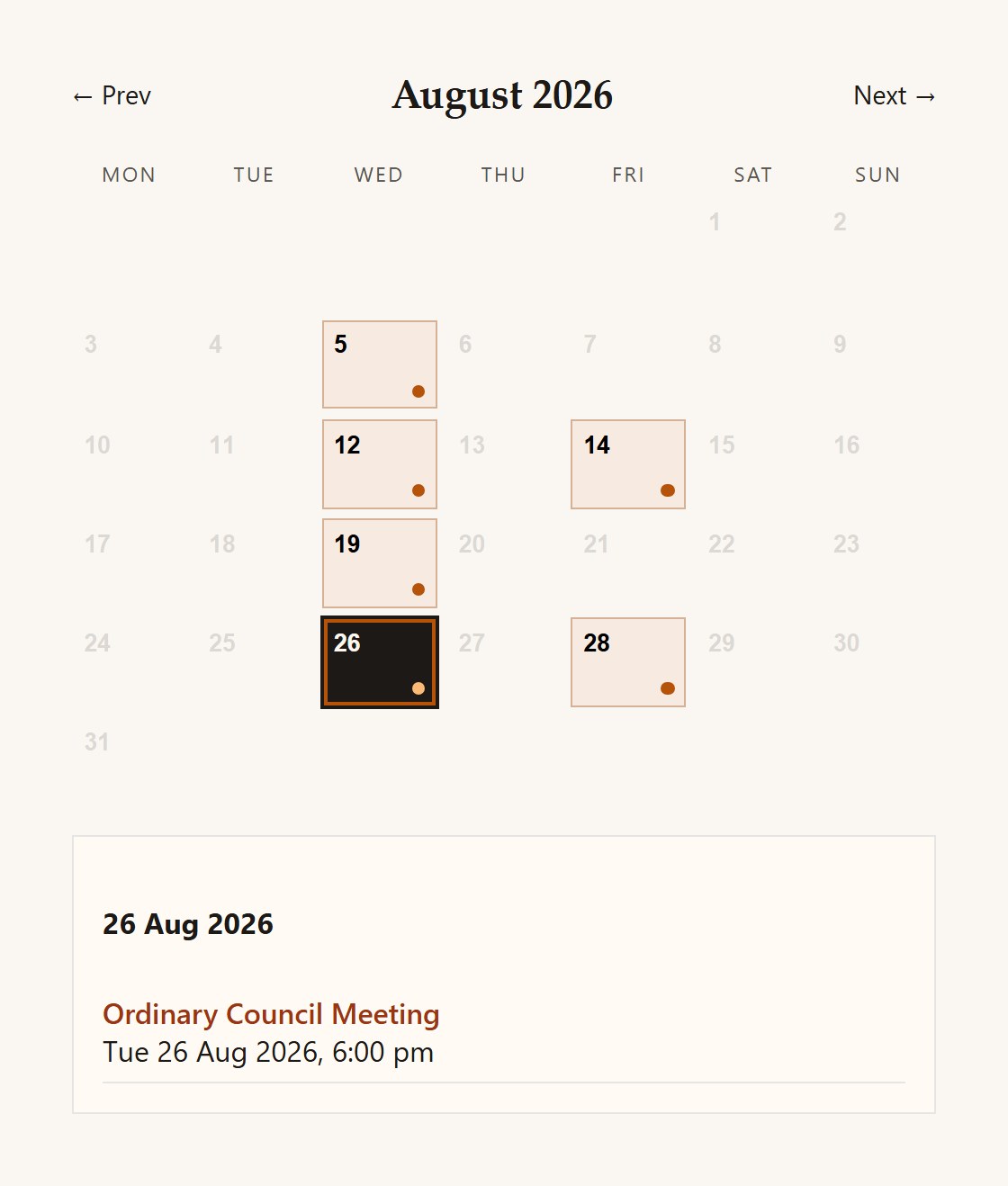
  • mod_wmevents_calendar — Month calendar with event days highlighted; optional next month
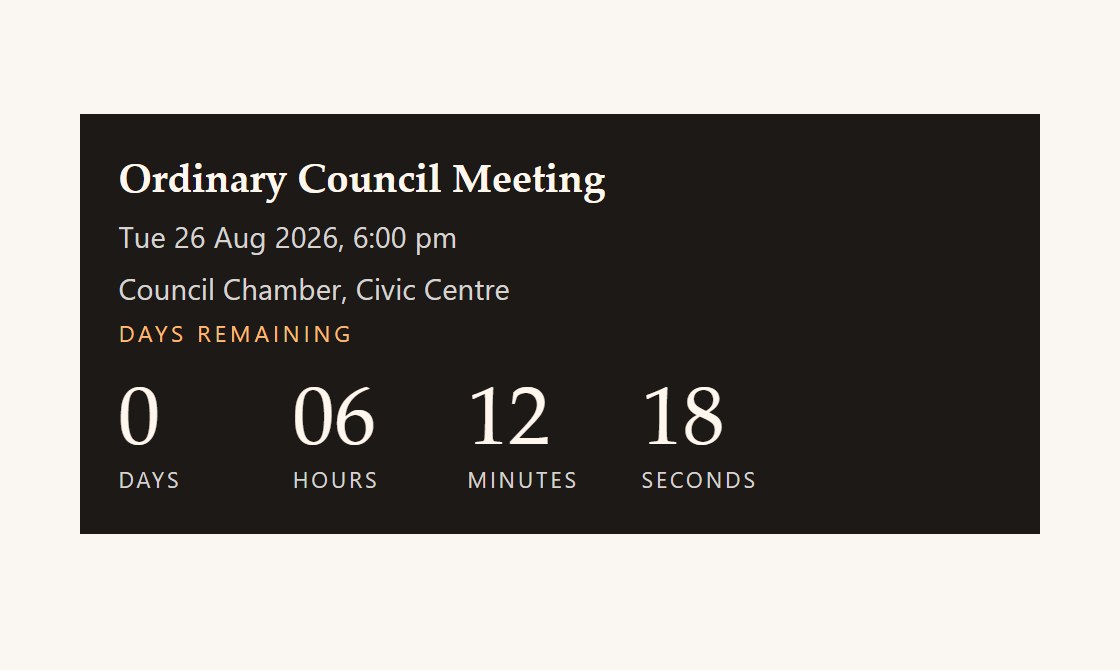
  • mod_wmevents_countdown — Countdown to a chosen event (days through seconds)

Current version: 1.0.1

Features

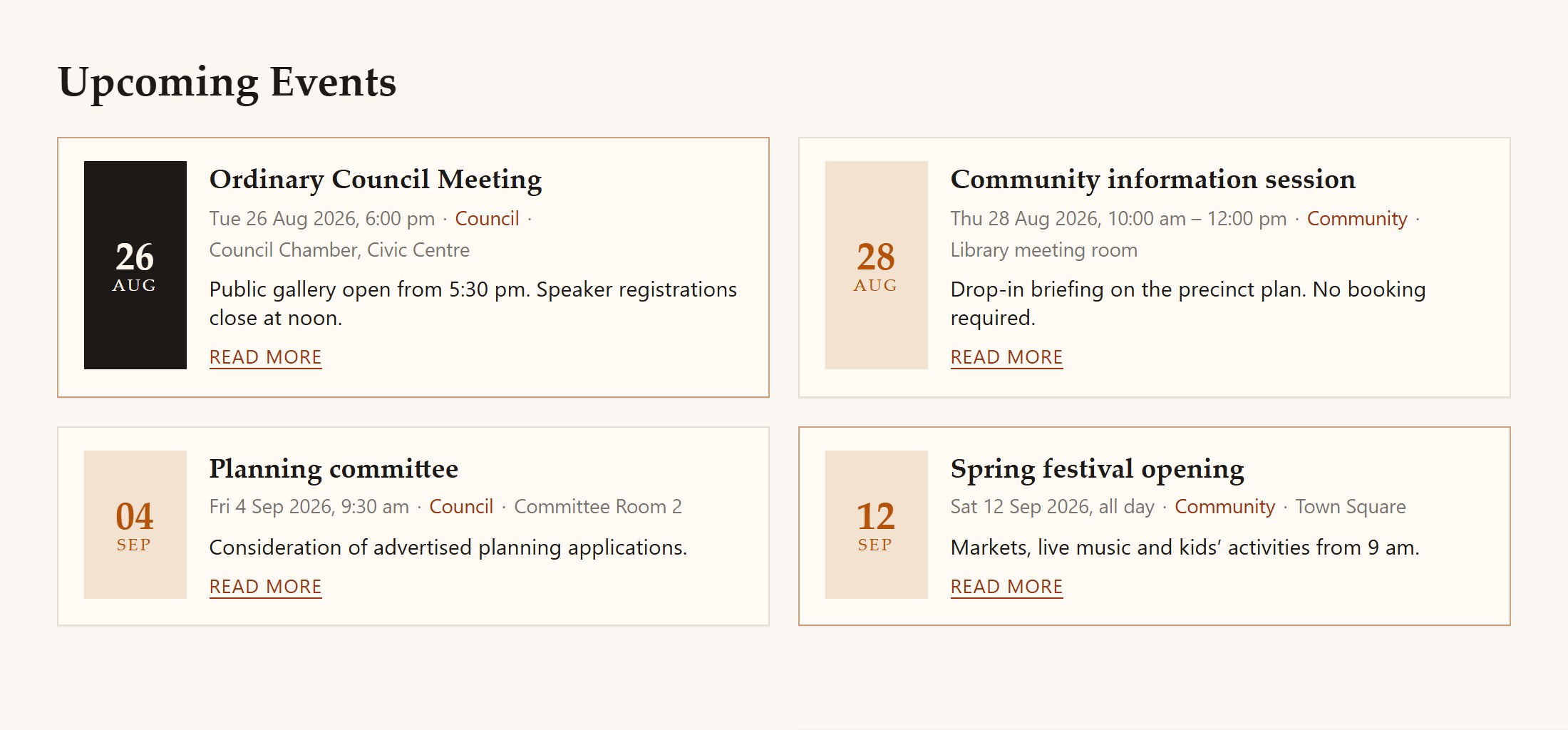
  • Upcoming events blog — leading, intro and link items, 1–4 columns
  • Automatic past-events archive once the end (or start) date has passed — no cron
  • Featured events, category blog, category list, single event and full-page calendar
  • All-day events stay current until the day is over
  • Important-date flag for a stronger calendar highlight
  • Venue, address, organiser, image, registration URL, tags and custom fields
  • Per-event countdown, or the global default
  • Joomla 6 native APIs — no Backward Compatibility plugin
  • MySQL / MariaDB and PostgreSQL install scripts

Admin

  • Components → wmEvents — create and edit events
  • Title, alias, description (optional read-more split), category, start/end, all-day
  • Featured and important-date flags
  • Venue, city, region, postcode, country, organiser and registration URL
  • Image, tags, custom fields, language, access and publishing window
  • Own categories (a General category is created on first install)
  • System → Global Configuration → wmEvents for countdown, columns and date format

Front end

  • Menu items: Upcoming Events, Past Events, Featured, Category Blog, List of Categories, Single Event, Events Calendar
  • Blog-style cards with date block, meta, intro and read more
  • Past events listed automatically when the date has passed
  • Single-event page with optional countdown and facts panel
  • Month calendar with today, event-day and important-date states
  • Responsive layout that follows the site template

Modules

  • wmEvents - Calendar: this month (and optionally next), category filter, important-dates-only
  • Click a highlighted day to list that day’s events
  • wmEvents - Countdown: pick an upcoming event, show days / hours / minutes / seconds
  • Optional date, venue and title link; hide when the event has started

Best suited for

  • Council and committee calendars
  • Association and industry event listings
  • Community organisations and clubs
  • Any Joomla 6 site that needs upcoming and past events without a heavy commercial calendar

Documentation

Install, configure & use

WM Events is a free Joomla 6 package (component + calendar module + countdown module) for public event calendars. Publish upcoming and past events, highlight important dates, and show a month grid or a countdown in any module position.

Requirements

  • Joomla 6.0 or later (developed for 6.1)
  • PHP 8.3 or newer
  • MySQL 8 / MariaDB 10.4 or PostgreSQL 12
  • No Behaviour - Backward Compatibility plugin required

Install

  1. Download pkg_wmevents-1.0.1.zip from this page.
  2. In Joomla: System → Install → Extensions → Upload Package File.
  3. Select pkg_wmevents-1.0.1.zip and install.
  4. Confirm com_wmevents, mod_wmevents_calendar and mod_wmevents_countdown installed successfully.

Quick start

  1. Open Components → wmEvents. A General category is created on first install.
  2. New — set title, start (and optional end), all-day, venue, image, featured / important as needed.
  3. Menus → Add New Menu Item → wmEvents → Upcoming Events. Add Past Events, Featured, Category Blog, Calendar or Single Event as required.
  4. Content → Site Modules → New → wmEvents - Calendar (month grid) and/or wmEvents - Countdown (pick an event).
  5. Optional: System → Global Configuration → wmEvents for default countdown units, blog columns and date format.

More detail

Uninstalling the package removes the component and both modules. Individual uninstall of the children is blocked. Events are not moved by a cron job — any published event whose end date (or start date if there is no end) is in the past appears under Past Events. After install, clear Joomla cache if styles or language strings do not appear immediately.

License

GNU General Public License version 2 or later

GPL-2.0-or-later

This software is free software: you can redistribute it and/or modify it under the terms of the GNU General Public License as published by the Free Software Foundation; either version 2 of the License, or (at your option) any later version.

This program is distributed in the hope that it will be useful, but WITHOUT ANY WARRANTY; without even the implied warranty of MERCHANTABILITY or FITNESS FOR A PARTICULAR PURPOSE. See the GNU General Public License for more details.

A copy of the license is included in the package as LICENSE.txt. Full text: gnu.org · GPL v2.

  • Install on as many of your own Joomla sites as you like
  • Licensed under GPL-2.0-or-later (same family as Joomla)
  • Support and custom development available on request

Support

Get help

Community support via the contact form on this site. Commercial support, branding and custom features available on request from WM Studios.

Support & custom work

Built for real production use — including document-heavy resource libraries. For support, branding tweaks or custom features, contact WM Studios.