WM Open · Joomla 6

WM Comments for Joomla

Free v1.0.10

Native commenting for articles and other components

Native Joomla 6 commenting: threaded replies, moderation, ACL, CAPTCHA via Joomla, a latest-comments module, a privacy plugin, and a public PHP API for other components.

Requires Joomla 6.0+ · PHP 8.3+ · MySQL 8 / MariaDB 10.4 or PostgreSQL 12 · GNU General Public License version 2 or later · Package pkg_wmcomments

Why this package?

Sites that need native article comments without a heavy third-party suite:

  • Threaded replies with moderation and ACL
  • Guests and registered users, independently, with Joomla CAPTCHA
  • A latest-comments module for sidebars and article pages
  • Privacy export/delete and Smart Search for published comments
  • A PHP API so other components can render the same thread

WM Comments is that engine — a Joomla 6 package (component + module + plugins), released free.

Capabilities

What’s included

Package contents

  • com_wmcomments — Main component — threads, moderation, options and public render API
  • mod_wmcomments_latest — Site module — latest published comments (list or cards)
  • plg_content_wmcomments — Content plugin — embeds threads on articles (enable after install)
  • plg_privacy_wmcomments — Privacy plugin — export and delete with Joomla Privacy (enabled on install)
  • plg_finder_wmcomments — Smart Search (Finder) plugin — published comments appear in site search

Current version: 1.0.10

Features

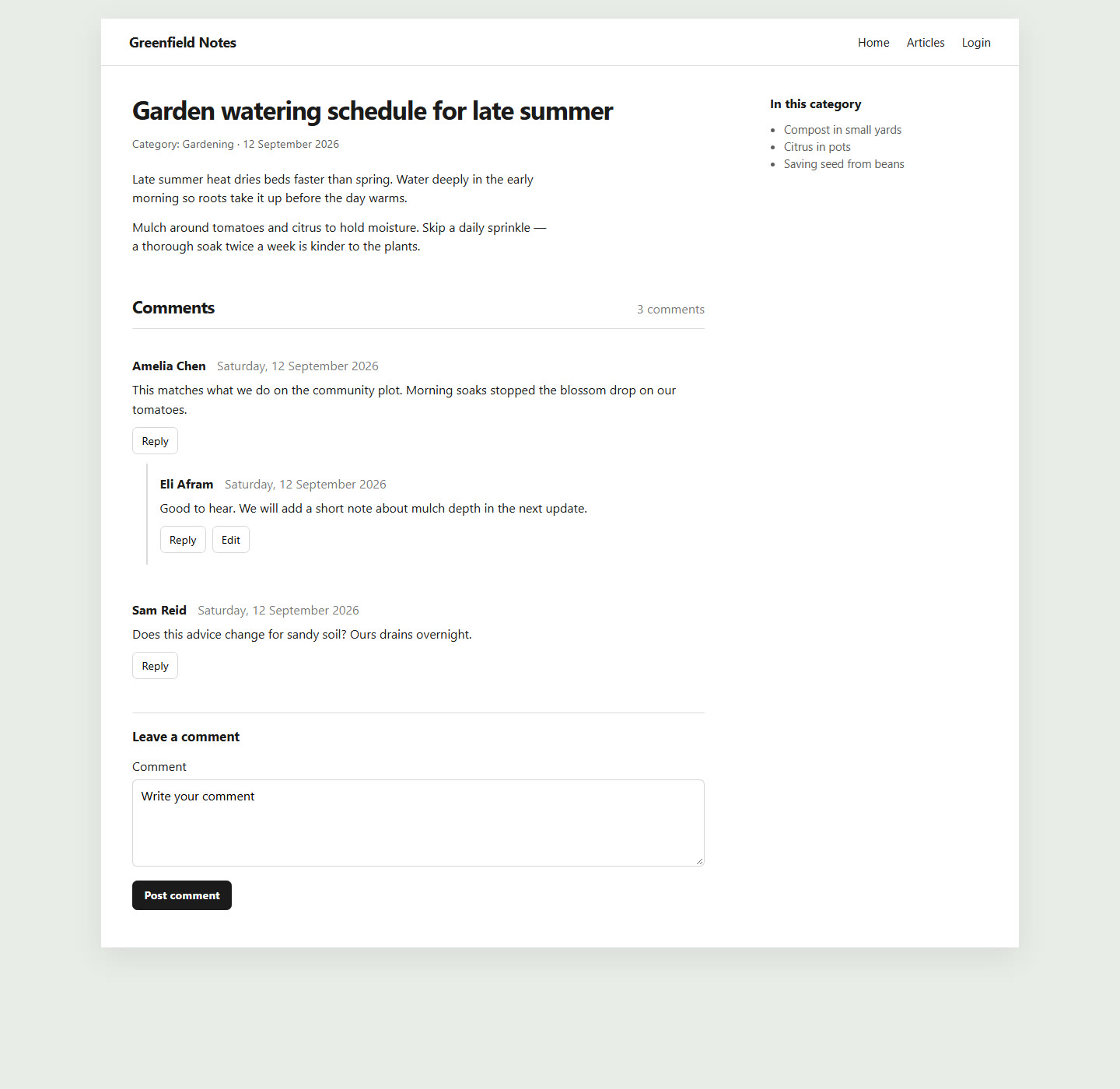
  • Threaded replies with a configurable maximum depth
  • Guest and registered commenting, independently
  • CAPTCHA via Joomla’s captcha plugins (guests on by default)
  • Moderation: auto-publish registered, hold guests, or hold everyone
  • Blacklists: blocked guest names (exact, case-insensitive) and blocked words/phrases (whole-word in name or body)
  • ACL, publishing window and comments-per-page
  • Mail templates for new comments and replies
  • Per-article and per-category enable/disable
  • Latest comments module — published comments only, list or cards
  • Public PHP API so other components can render a thread
  • Privacy plugin for information requests and user deletion
  • MySQL / MariaDB and PostgreSQL install scripts

Admin

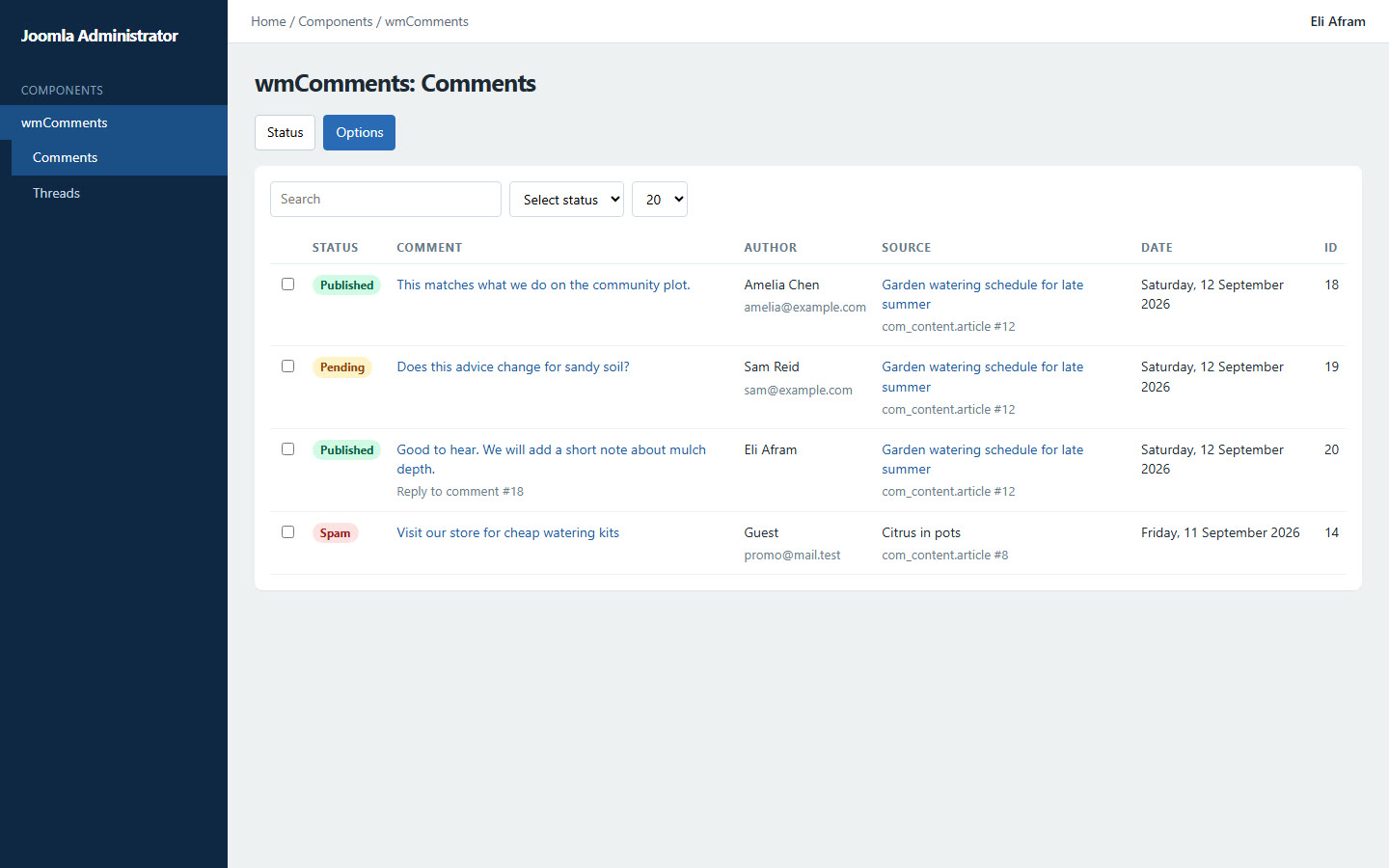
  • Components → wmComments — comments list, threads and options
  • Publish, unpublish, trash and edit comments — including publish from the edit screen
  • Admin edit keeps thread_id and other structural columns; form POSTs cannot overwrite them
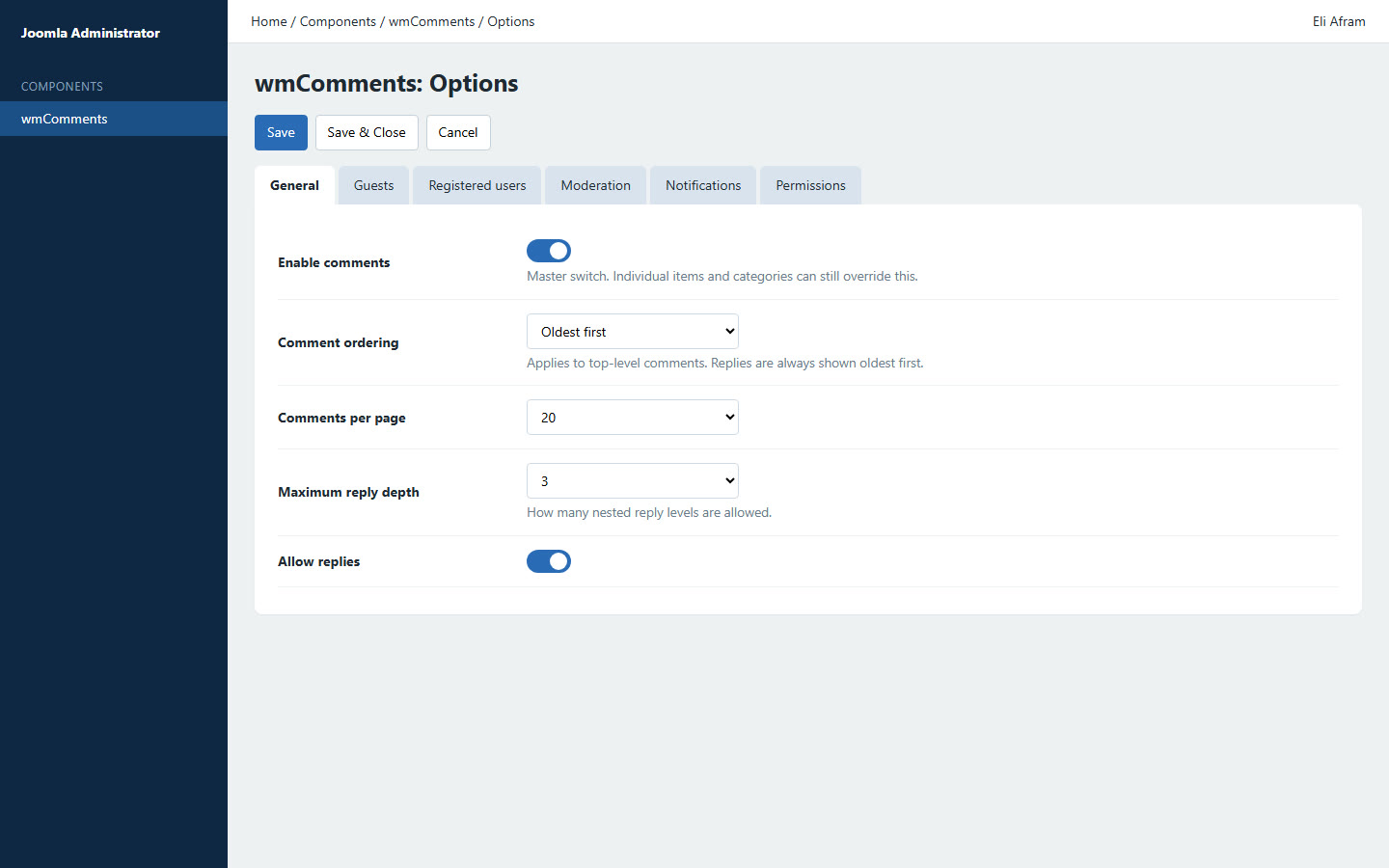
  • General: ordering, per page, max depth, replies, min submit seconds
  • Guests: allow, require name/email, CAPTCHA
  • Registered users: allow, optional CAPTCHA
  • Moderation: auto-publish registered and/or guests, plus guest-name and word blacklists
  • Notifications via Joomla mail templates
  • Permissions for comment, reply, edit own, moderate

Front end

  • Thread under (or above) the article body via the content plugin
  • After posting (JavaScript and no-JS), notices appear above the comments thread — not at the top of the page
  • Reply in place; edit own comment where permitted
  • Pagination on long threads
  • Locked threads when comments are disabled for that item
  • Template overrides under html/com_wmcomments/
  • Assets load only when a thread is rendered

Module, plugins & API

  • Latest module: limit, current article or category, exclude replies, list or cards
  • Content plugin: after or before article content; leave blog listings off
  • Privacy plugin: enabled on install for export and delete
  • Finder plugin: published comments in Joomla Smart Search
  • PHP API: bootComponent('com_wmcomments')->comments()->render($context, $id, $opts)

Best suited for

  • News and association sites that need moderated article comments
  • Public-sector pages where guests may comment with CAPTCHA
  • Other Joomla 6 components that need a native comment thread

1.0.4

Admin edit, notices and blacklists

This release hardens admin edit, puts post notices next to the thread, and adds moderation blacklists.

  • Admin edit/save — database rows keep thread_id and the other structural columns; form POSTs still cannot overwrite them. You can edit a comment and publish it from the edit screen.
  • Notices — after posting (JavaScript and no-JS), the message is shown above the comments thread, not at the top of the page.
  • Blocked guest names — one name per line, exact match, case insensitive (Comments → Options → Moderation).
  • Blocked words — one word/phrase per line, whole-word match in the name or body.
  • Moderators are not checked. Rejected posts get the existing generic “comment was rejected” message.

Documentation

Install, configure & use

WM Comments is a free Joomla 6 package (component + latest-comments module + content, privacy and Smart Search plugins) for native article comments. Threaded replies, moderation, guests, CAPTCHA and a PHP API for other components.

Requirements

  • Joomla 6.0 or later (developed against 6.1)
  • PHP 8.3 or newer
  • MySQL 8 / MariaDB 10.4 or PostgreSQL 12

Install

  1. Download pkg_wmcomments_v1.0.10.zip from this page.
  2. In Joomla: System → Install → Extensions → Upload Package File.
  3. Select the zip and install.
  4. Enable Content - wmComments. Confirm Privacy - wmComments and Finder - wmComments are enabled.

Quick start

  1. Open Components → wmComments → Options and set guests, CAPTCHA and moderation.
  2. Open an article. The content plugin inserts the thread after the body by default.
  3. (Optional) Override position or disable comments on a category or article.
  4. (Optional) From another component, call comments()->render($context, $id).
  5. (Optional) Content → Site Modules → New → wmComments Latest for a sidebar or article module.

More detail

Enable the content plugin after install or comments will not appear on articles. The latest-comments module is not published automatically. Individual uninstall of package children is blocked. After install, clear Joomla cache if styles or language strings do not appear immediately.

License

GNU General Public License version 2 or later

GPL-2.0-or-later

This software is free software: you can redistribute it and/or modify it under the terms of the GNU General Public License as published by the Free Software Foundation; either version 2 of the License, or (at your option) any later version.

This program is distributed in the hope that it will be useful, but WITHOUT ANY WARRANTY; without even the implied warranty of MERCHANTABILITY or FITNESS FOR A PARTICULAR PURPOSE. See the GNU General Public License for more details.

A copy of the license is included in the package as LICENSE.txt. Full text: gnu.org · GPL v2.

  • Install on as many of your own Joomla sites as you like
  • Licensed under GPL-2.0-or-later (same family as Joomla)
  • Support and custom development available on request

Support & custom work

Built for real production use — including document-heavy resource libraries. For support, branding tweaks or custom features, contact WM Studios.